
On this page...
Spotting ExpertReview's suggestions in the survey editor just got easier. The icons used to flag ExpertReview recommendations have been updated, making it simpler for survey builders to notice suggestions as they work and address them before publishing.
Back to topWhat Are the Benefits of This Enhancement?
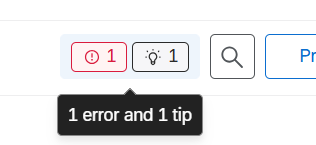
- Clearer Prioritization: The new icons make it easier to tell errors, warnings, and tips apart at a glance, so you can prioritize and review the most important issues first.
- Easier to Spot: The refreshed icons stand out more clearly in the survey editor, so you're less likely to miss a recommendation while building your survey.
- Faster Fixes: Because suggestions are easier to notice up front, you can resolve issues as you go instead of catching them all at once before publishing.
- Same Trusted Recommendations: The underlying ExpertReview checks haven't changed. You still get the same guidance on methodology, survey errors, compliance, and data quality, just easier to find.
When Was This Rolled Out?
This enhancement was officially rolled out in July 2026. It is now active in the survey editor for all surveys using ExpertReview.
Back to topHow Does This Impact Our Review Process?
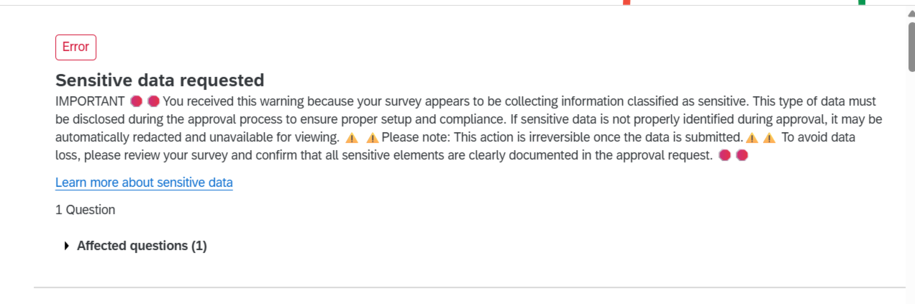
- Sensitive Data Reporting Still Required: These new icons make it easier to spot when ExpertReview flags sensitive data in your survey, but our review process has not changed. You must still always report a Sensitive Data flag during the approval process, exactly as you have been doing.
- Why This Matters: If sensitive data is not properly identified and documented during approval, it may be automatically redacted and become unavailable for viewing. This action cannot be undone once the data is submitted.
- What to Look For: Watch for the red error icon in the survey editor, shown below. It will call out all errors, including sensitive data requests, which should always be reviewed before you publish so you can confirm that every sensitive element is clearly documented in your approval request.
We hope this clearer view helps you use ExpertReview to build great surveys at the State of Iowa.
Back to topHow Can I Learn How to Use It?
To learn more about how ExpertReview works and how to use its recommendations, check out the official documentation:
- Check out the Qualtrics Support Article on ExpertReview Functionality for step-by-step instructions and best practices.
- Watch the ExpertReview Icons and Categorizations training video from our Qualtrics Technical Success Manager on our Qualtrics YouTube channel.