On this page...
Drupal’s Content Moderation system allows for a structured review and approval process, or workflow, before content is published.
In the DX Platform, content moves through a series of moderation states. These states determine both its visibility and where it is in the editorial workflow. Below are the available moderation states and their meanings:
Back to topDraft
- Content is in progress and has not yet been submitted for review or publication.
- It is only visible to users with appropriate permissions, such as content Editors or Agency Managers.
- This status allows contributors to save work without making it available to the public.
- All user roles have access to save content as Draft.
- See below for more information regarding Draft versions of already Published content.
Review
- Content has been submitted for editorial review by approvers who will assess its quality before publishing.
- It is visible to users with Writer, Editor, Publisher, or Agency Manager roles.
- The content is not yet published but is undergoing internal approval.
Published
- Content is live and visible to the public.
- It has passed all necessary reviews and approvals.
- If changes are needed, an editor can create a new Draft, or forward revision, while keeping the previously published version available. See below for more details about how this works.
Archived
- HTML content is no longer publicly accessible but is retained in the system for historical or reference purposes.
- Note: This doesn't apply to Documents such as PDFs. PDFs can be marked as archived but will be noted as such if linked on your website.
- Archived HTML content is not deleted, meaning it can be restored or republished if needed.
- This status helps manage outdated or deprecated content without removing it permanently.
Creating and managing Forward Revisions of published content
When you create a new forward revision or Draft of already published content, Drupal allows you to work on updates without immediately affecting the live version.
Here's how this process works:
Back to topCreating a new Forward Revision or Draft
- Navigate to the published page you wish to update.
- Click the Edit button to modify the content.
- Make the necessary changes.
- Save the changes as a Draft. This action creates a new revision in the Draft state, while the original published version remains live on the site.
Reviewing and approving the Forward Revision or Draft
- Users with appropriate permissions can access and review Forward Revisions or Drafts.
- To review the Forward Revision, navigate to the content item and select the Revisions tab. Here, you'll see a list of all revisions, including the latest draft.
- Review the changes in the Forward Revision by clicking on the date.
- If the Forward Revision is ready for publication, navigate back to the Revisions tab and click on Set as current revision. This action replaces the old published version with the updated content. Or you can open the Revision in Edit mode, change the status to published, and select Save.
How to enable workflow settings
Add a SendGrid API key to activate email notification settings for all Agency Managers on your agency's team.
To set up this feature, the Agency Manager will need to contact the DOM DoIT team. They will create a new key for the external email service. To ask for a key, file a ServiceDesk Plus ticket and ask for SendGrid key for email notifications via the DX Platform using the third-party service.
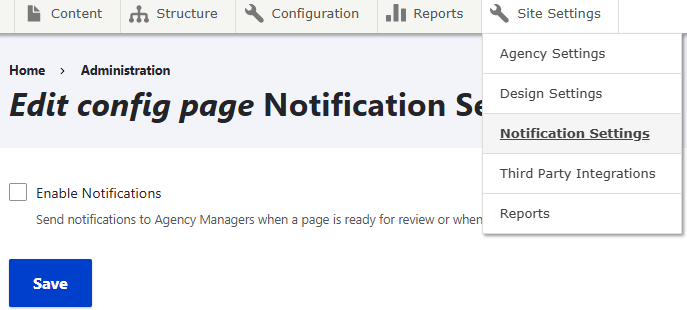
Once you have the key, in Edit mode on any page navigate to Site Settings > Notification Settings and check the Enable Notifications box. When that box is check, a second box will appear to input the SendGrid key along with the sender's email address. Select Save. This will send a notification to your Agency Managers that a page is ready to be reviewed.