
Welcome to the latest Qualtrics bulletin! This is your last call for the October 27 training, where we're covering a lot of ground. We also have two Okta changes that went live this week, a great highlight story from DAS, and two new trainings on the calendar for November and December.
Last Call: Review and Approval Process Training
This is the one to attend. We are covering a lot of ground in two hours, and most of it is the kind of thing that comes up in your questions every week.
- Date: Tuesday, October 27, 2026
- Time: 10:00 a.m. to 12:00 p.m.
- Format: Virtual via Microsoft Teams
What we'll cover:
- The new AI review report
- What a service account is, and why you would want one
- The sensitive data policy and what it means for your surveys
- The review and approval process, walked through again from the start
- How to republish, including a first look at a new, easier way
- Best practices and the most common mistakes we see
We're opening the session with a look back at some of the big wins and numbers from our first year on the platform, so make sure you join right at the start to catch it.
You can find all the event details by visiting Review and Approval Process Training: Best Practices and New Republishing Steps.
Two Okta Changes Went Live This Week
Two behind-the-scenes changes to how people sign in to and use Qualtrics went live Wednesday, October 21, 2026, at 9:00 a.m. No issues to report. Here is what each one means for you.
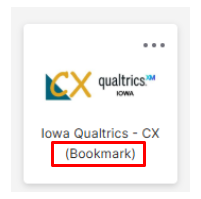
- Your Qualtrics role now comes from Okta. Your role, also called your user type, decides what you can do in Qualtrics. It used to be set by hand inside Qualtrics. Now it is set automatically by your Okta group instead, putting role control in one place. The one thing you may notice is that the Qualtrics tile on your Okta dashboard now says bookmark instead of SAML. That is a very small difference.
- Surveys can now require an Okta sign-in. Survey creators can limit a survey so it can only be opened by people who sign in through Okta as state employees.
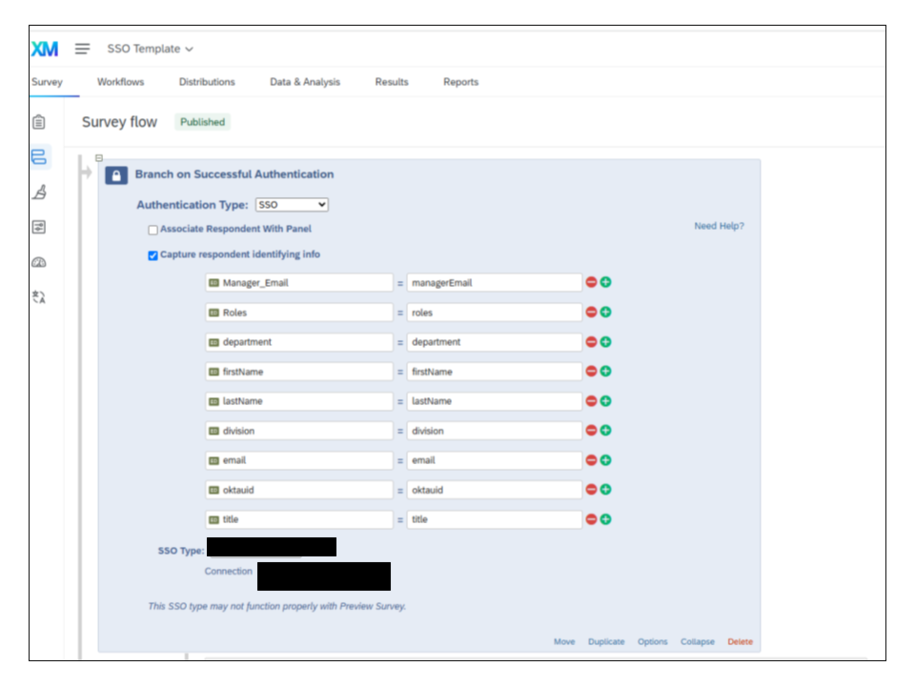
Why we made this change: Several agencies asked for a way to keep their internal forms open to state employees only. These two changes put that kind of access control in place and ready to use.
There is nothing you need to do. There should be no impact on your surveys or your access. You will see this authentication option live in the October 27 training, where we will show what it looks like when you request to republish, so that is one more good reason to attend.
If you do run into an issue, please report it by visiting Submit a Qualtrics Request in ServiceDesk Plus. To learn more about the feature itself, visit the Qualtrics Support article on the SSO Authenticator.
Highlight Story
We want to showcase real success stories from our colleagues, highlighting what is possible and celebrating their achievements.
Today, we recognize Liz Luiken and the Department of Administrative Services (DAS) for modernizing the Certified Public Manager (CPM) application process. What started as a paper-based PDF form turned into a fully automated online application with built-in workflows, signature collection, and reporting.
Agency: DAS
Creator: Liz Luiken
Project: CPM Online Application
Details: The CPM program is a nationally accredited professional development certification offered by the State of Iowa in partnership with Drake University to help build strong public leaders in each graduating cohort. To support the program, the goal was to move the CPM application from a PDF form to an online application with automated workflows for collecting information and signatures, ensuring all applicants worked from the same up-to-date application instead of outdated PDF versions.
This was several months of work for DAS, done in partnership with DOM and the Qualtrics Core Team, to troubleshoot and identify the best method for building an application that required approval contributions from three separate individuals, while still functioning as a single, seamless application. Liz built out the project slowly and made use of office hours, both group and one-on-one, to make sure the application worked exactly as intended.
Result: DAS replaced a manual, PDF-based process with a fully functioning application, complete with automated workflows, signature collection, reporting, and a ticketing system that's faster and more consistent for every applicant.
Great job, Liz and DAS!
To see all past highlight stories, including this one, visit the Highlight Stories page.
Tell Us Your Story!
We'd love to hear your Qualtrics success stories. Share yours today!
Just fill out the form below to start sharing your success story with us!
Highlighting Qualtrics Success Stories Form
Qualtrics CX Dashboard 101 Training
This beginner friendly training walks Qualtrics users through building and sharing their first CX dashboard. No dashboard experience is needed.
- Date: Thursday, November 12, 2026
- Time: 1:00 p.m. to 3:00 p.m.
- Format: Virtual via Microsoft Teams
If you have survey data and want to see it in a clear, shareable way, this session is for you. We will cover navigating the dashboard builder interface, core dashboard tools and widget types, connecting your survey data to a dashboard, customizing and organizing pages and widgets, and sharing a dashboard and managing who can view it. This session will be recorded for training purposes.
You can find all the event details by visiting Qualtrics CX Dashboard 101 Training.
Survey Logic Best Practices, Plus December's New Release Spotlight
This session combines December's Tuesdays with Qualtrics: New Release Spotlight with a deeper look at survey logic. We are covering a full month of new Qualtrics features, plus four tools that control what a respondent sees and when.
- Date: Tuesday, December 8, 2026
- Time: 10:00 a.m. to 11:00 a.m.
- Format: Virtual via Microsoft Teams
What we'll cover:
- Skip Logic: Jumping a participant past questions that no longer apply, based on an earlier answer
- Display Logic: Showing or hiding a question, page, or specific answer choices based on conditions you set
- Loop and Merge: Repeating a block multiple times for the same respondent, often paired with Display Logic to control what shows in each pass
- Branch Logic: Sending a respondent down a different path through entire blocks in the Survey Flow, not just individual questions
Join us for the whole hour to catch both the release roundup and the logic deep dive. This session will be recorded for training purposes.
You can find all the event details by visiting Loop & Merge, Display Logic, Block Branching, and Skip Logic Best Practices.
Know Your Survey ID, Because We're Going to Ask
It is the first question we ask when you bring us a problem. Knowing where to find your Survey ID turns a few rounds of back and forth into a single message.
A Survey ID is the unique code assigned to each survey in Qualtrics. It always begins with SV_, and it shows up right in the URL. Our guide shows you exactly where to look in three different views: the Survey Builder, the Preview, and your published survey.
Having it ready means we can go straight to your survey instead of asking which one you mean and waiting for a reply. It also helps you search for your own surveys inside the platform.
Visit Locate my Survey ID to see where to find it in each view.
A Quick Ask: Office Hours and 1:1s for How-To and Program Questions
We've been busy lately, and we love it. Keep the questions coming, we're here to support you.
That said, please bring your how-to questions, program questions, or anything in between to Office Hours or a 1:1 booking, instead of one-off messages, if possible. Here's why it matters: some questions need more than a quick reply, and Office Hours and 1:1s give us the time to actually dig in with you. We don't always have the answer off the top of our heads, but between our team and Qualtrics's Technical Success Managers, we can almost always find one, and we've got some fun, creative ways of getting that answer back to you.
We've seen an increase in questions in this area lately, and we're working on the best way to address it. If you have feedback or ideas, please send them to Jessica Van Heuveln.
Additional Resources and Support
- If you missed earlier bulletins, you can find them on the Qualtrics Bulletins listing page.
- We provide several support options to help you, including On-Demand Training, Basecamp, one-on-one sessions, Office Hours, and many other resources.
- You can access all of these on the Qualtrics Training and Support page.
Thank you!