
Welcome to the latest Qualtrics bulletin! If you missed our October 27 training, this issue is your catch-up: we're covering why it's still worth watching, what changed with republishing on November 4, a note on November's New Release Spotlight, and our upcoming Dashboard 101 training.
Catch Up on the October 27 Review, Approval and Republishing Training
Our October 27 training is in the books, and if you missed it, make time for it now. This wasn't a skip-it-and-move-on session: we covered the new AI review report, service accounts, the sensitive data policy, the review and approval process from the start, and the new, easier way to republish that went live this week.
There's a slide deck too, and it's worth reviewing alongside the recording. It covers the review and approval process, common mishaps, and the republishing change in more detail than the recording alone.
Visit Qualtrics CX Review, Approval and Republishing Training to access the recording and slide deck.
New Guide: Guide to Republish
As of November 4, 2026, republishing works differently. There's a new guide covering exactly what changed: Guide to Republish.
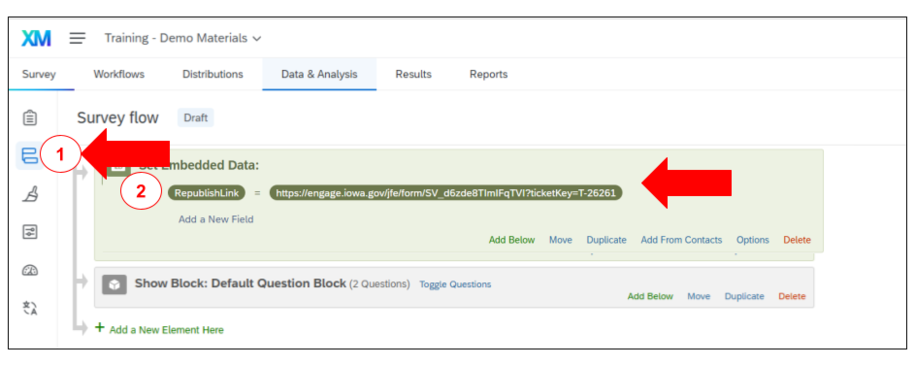
You no longer submit a Qualtrics ServiceDesk Plus request, or click the blue Publish button, to republish a survey that's already live. Instead, you'll use a new republish link tied to your individual survey, found right in your Survey Flow.
Before you request a republish, make sure you:
- Review and learn the new republishing process by visiting the Guide to Republish
- Review Critical Guidance for Editing a Published Survey
- Know what you changed in your survey and why
- Know you'll need to describe your changes. The more detail, the better
Fall Cleaning: The Review and Approval Dashboard Is All Cleaned Up
Fall cleaning happened behind the scenes too. The Review and Approval Dashboard has been cleaned up, and we want to say thank you to everyone who helped make that happen.
If you haven't checked out the CX Studios and Review and Approval Dashboards, now's the time. It's one of the easiest ways to keep tabs on your own surveys: see exactly where each one sits in the review and approval process, without having to ask us, plus a lot more once you're in there.

No New Release Spotlight on Tuesday, November 10
There will be no special product release training on Tuesday, November 10, 2026. There are no major product releases to demonstrate this month, so we are skipping that session.
Our regular Office Hours will still take place as usual, so please still join us and bring your questions. You can find all the details on the Qualtrics Office Hours and Training Classes page.
The next Spotlight is Tuesday, December 8, 2026, and it's a combined session: we're pairing it with Loop and Merge, Display Logic, Block Branching, and Skip Logic Best Practices.
Qualtrics CX Dashboard 101 Training
Date: Thursday, November 12, 2026
Time: 1:00 p.m. to 3:00 p.m.
Format: Virtual via Microsoft Teams
This beginner-friendly training walks you through building and sharing your first CX dashboard.
We'll cover navigating the dashboard builder interface, core dashboard tools and widget types, connecting your survey data to a dashboard, customizing and organizing pages and widgets, and sharing a dashboard and managing who can view it.
This session will be recorded for training purposes.
You can find all the event details by visiting Qualtrics CX Dashboard 101 Training.
Know Your Survey ID, Because We're Going to Ask
It is the first question we ask when you bring us a problem. Knowing where to find your Survey ID turns a few rounds of back and forth into a single message.
A Survey ID is the unique code assigned to each survey in Qualtrics. It always begins with SV_, and it shows up right in the URL. Our guide shows you exactly where to look in three different views: the Survey Builder, the Preview, and your published survey.
Having it ready means we can go straight to your survey instead of asking which one you mean and waiting for a reply. It also helps you search for your own surveys inside the platform.
Visit Locate my Survey ID to see where to find it in each view.
Additional Resources and Support
- If you missed earlier bulletins, you can find them on the Qualtrics Bulletins listing page.
- We provide several support options to help you, including On-Demand Training, Basecamp, one-on-one sessions, Office Hours, and many other resources.
- You can access all of these on the Qualtrics Training and Support page.
Thank you!