
On this page...
In support of the April 24, 2026, compliance deadline for accessibility DOM DoIT has purchased a limited number of CommonLook licenses for each agency. If you're interested in a license, please contact Todd Peterson and he will help connect you with your agency's representative to confirm availability and status.
Back to topCommonLook PDF
CommonLook PDF is a professional tool designed to remediate and validate PDF documents for accessibility compliance. Unlike CommonLook Office which works within Word and PowerPoint, CommonLook PDF focuses on existing PDF files ensuring they meet accessibility standards.
Key benefits
Access: Runs in a browser, no installation required.
Full control over PDF accessibility: Ideal for complex documents that require precise tagging.
Compliance with major standards: Supports Section 508, WCAG 2.0/2.1, and PDF/UA.
Advanced remediation tools: Handles tables, lists, forms, and other challenging elements.
Validation reports: Generates detailed reports to prove compliance.
CommonLook Office
CommonLook Office is an add-in for Microsoft Word and PowerPoint that helps users create accessible, standards-compliant PDF documents. It improves the default PDF export process by guiding users through accessibility checks and fixes before generating the final PDF.
Key benefits
User-friendly guidance: Provides step-by-step instructions to ensure accessibility compliance.
Time-saving automation: Automatically corrects many accessibility issues, reducing manual work.
Compliance assurance: Supports major standards like Section 508, WCAG 2.0/2.1, and PDF/UA.
Reliable tagging: Ensures proper tagging for styles and tables, including complex layouts.
Promotes best practices: Encourages accessibility awareness during document creation.
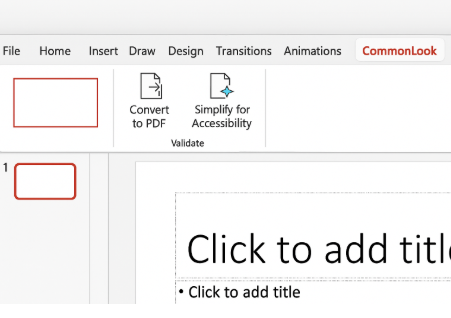
How can you tell if you have CommonLook Office installed?
Once users have provided their computer names, software will be pushed to most users via Manage Engine.
Open Microsoft Word or PowerPoint.
Go to the Add-ins or Ribbon area.
Look for a tab or menu labeled CommonLook.
If you see it, the add-in is installed.
Training information
- Browse and register for free training sessions.
- Reach out to Support at support@allyant.com for access requests, technical issues, training, or to receive product support.
- CommonLook training Office Hours are offered every Tuesday and Friday from 12-1 p.m. CST (1-2 p.m. EST).