
What are screen readers?
Screen readers are software programs that allow blind or visually impaired users to read the text that is displayed on the computer screen with a speech synthesizer or braille display. They are separate software programs that must be installed individually on a computer or tablet.
Adobe
Adobe Acrobat and Reader have a built-in Read Out Loud feature that can be found under the View menu in the top-left corner, or within the small menu in the top right corner. Select the headphones icon to enable the Read Out Loud feature.

Microsoft Word
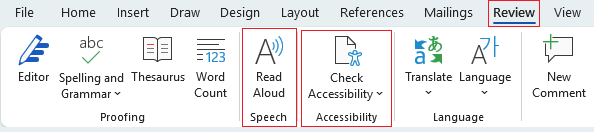
Word has a built in Accessibility Checker and Screen Reader under the main menu item Review. After selecting the Review link, you'll see a menu drop down with a link for Check Accessibility that includes additional options to check the accessibility of your Word document, check your Alt Text, and Navigation Pane where you can click a heading or a page and go that item.
Another item in that drop down is Read Aloud. You can have Word read your document by selecting this option. Place your cursor in front of the title, heading, or paragraph you would like it to read aloud, then click the Read Aloud button.
Other Screen Readers
Free and paid screen reader software is available. If the software you'd like to use is free or requires paid licenses, you'll need your manager's approval, then submit a ServiceDesk Plus ticket with that manager approval included to start the process.