
For website issues, help, or bugs, please submit a ServiceDesk Plus ticket. The request will be routed to the Website and Digital Services team to be addressed. If the issue is determined to be a Drupal issue or bug, the information will be forwarded to Lullabot. (Non-state employees can report website issues or request support using this form.)
Need to Submit a Support Ticket?
Non-State employees can submit a support ticket using the support form.

When submitting a new problem, you'll be asked to choose a Request Type. Your options are Incident, Request For Information, or Service Request.
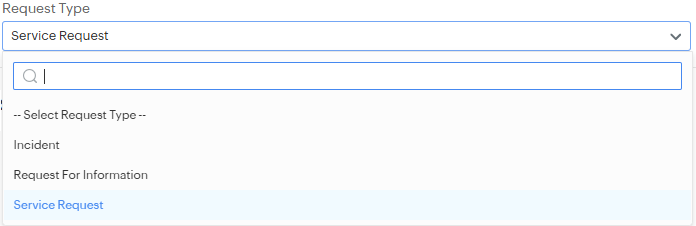
- An Incident is used when something that normally works is broken or malfunctioning - like a system outage, login issue, or hardware failure.
- A Service Request is used when you need something new - such as access to a system, installation of software, or ordering equipment.
Choosing the correct type ensures your request is routed to the right person and uses the correct template to ask the necessary questions.
Still not sure about submitting a support ticket?
Ask Yourself: “Is something broken or disrupted?”
Yes? → Submit an Incident.
No? → You likely need a Service Request.
If your issues relate to an existing Drupal (non-DX platform) website, the request will be routed to the OCIO Drupal Website assignment group for Webspec to respond.
If your website is supported by a vendor other than DOM DoIT, Webspec, or Lullabot, please contact your vendor directly.
If you have a feature enhancement request, please use this form to submit your feature idea.
Qualtrics FAQs
Frequently asked questions about the Qualtrics platform.
If you have been granted access to Qualtrics, please follow these instructions on the How Do I Log In to Qualtrics CX? page.
When clicking on the Qualtrics CX tile will automatically provision your account as a Standard User.
If you need access or are experiencing login issues, please submit a Qualtrics request through ServiceDesk Plus.
With the New Survey Taking Experience survey on by default, it meets the WCAG 2.1 AA accessibility standards for key features, the full list of which can be found in Overview of Improvements. Please refer to this article in the Federal Register for compliance dates for WCAG 2.1 AA.
Before publishing, an additional accessibility review will be conducted by the review team. This step will help confirm the presence of all ALT text and identify any other potential errors made by the content creator.
We strongly encourage all creators to utilize the built-in ExpertReview feature. This will help them to design optimal surveys and ensure compliance.
API or SFTP workflows in the FedRAMP High environment typically connect only to other FedRAMP environments. Qualtrics offers a robust API, but each case is subject to review by the DOM IT Governance team.
This page covers the main concepts for workflows and how to manage workflows after they’ve been built. See Building Workflows for instructions on how to build a workflow.
The DX Steering Committee, composed of members selected by IGOV to make decisions regarding the look and feel of the state of Iowa, convened to discuss branding and survey navigation. The committee's objective is to provide a trusted and safe experience for our constituents.
Theming
Each agency will have the state logo, followed by the agency name at the top of each form when in full screen and a portion of the website footer will be displayed.
Agencies having attached units that maintain their own sites (e.g. State Public Defender within DIAL), will have additional theme options available to identify those units.
If additional themes are needed, they must be approved by the Public Information Officer or a designated approver.
Display Name and Description
To ensure a positive browsing experience and to build constituent trust, a display and survey description are required for each published survey.
Survey Navigation
The labels "Back" and "Next" will be used to navigate through forms.
To learn more visit How Do I Brand and Theme a Survey? resource.
Given the environment is FedRAMP High , we are authorized to collect SSNs. Our Sensitive Data Policy masks SSNs by default; however if given prior authorization to collect this data, approved users can see collected SSNs or other sensitive information.
Qualtrics is FedRAMP High and all approved data centers are located in the continental USA.
Users can upload multiple documents, but these must be separated into different survey questions; alternatively, the user can upload a ZIP file. The maximum file size for uploads is 50 MB.
Uploaded files from surveys are scanned for viruses during the upload process. This scanning occurs synchronously and utilizes ClamAV, an industry-standard antivirus tool that is regularly updated with the latest signature databases. If malware or a virus is detected in an uploaded file, the upload will be aborted, the file will not be stored, and an error message indicating the presence of the virus will be returned to the user and logged internally.
For more information about the File Upload question, please refer to this Qualtrics Support resource.
In Qualtrics, if certain data requires different retention periods, we can set various exemptions to meet business and security needs.
We received several highly sensitive questions regarding infrastructure and other back-end setup. This information should not be publicly displayed due to confidential cybersecurity information, as per Iowa Code § 22.7(50).
You can pass a session ID token from an external app to Qualtrics for the purpose of securing access to complete a form, primarily using the SSO Authenticator feature. Qualtrics supports various SSO authentication types including Token-based SSO, which allows a third-party to generate a secure token containing encrypted user information. This token is passed to Qualtrics, decrypted, and then used to authenticate the user before allowing access to the survey. The Token SSO authenticator can also be configured to capture identifying information such as embedded data within the survey results. Additionally, tokens can be configured with expiration and other security attributes to maintain session security. For detailed setup, you would use the Authenticator element within the Survey Flow and configure it as a Token type SSO with the necessary encryption parameters and keys provided by your external app to Qualtrics.
Qualtrics supports a Signature question type in the New Survey Experience (the default survey interface), allowing respondents to provide their signature by either typing or drawing, with the ability to switch between both input methods.
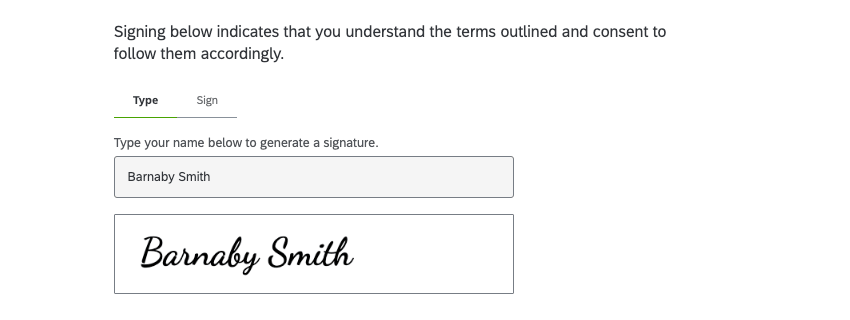
Depending on your use case, you may need to collect specific metadata to support authentication. We strongly recommend consulting your agency’s legal team to determine what constitutes a valid and authorized signature.
Qualtrics automatically collects metadata related to survey submissions. Below is a list of metadata that is collected by default.
- Start Date
- End Date
- Response Type
- IP Address
- Progress
- Finished
- Recorded Date
- Duration (in seconds)
- Response ID
- Location Latitude
- Location Longitude
- User Language
Additional metadata can be enabled in Qualtrics to support compliance and auditing requirements. These settings must be configured during the survey design phase by adding the Meta Info question type.
This is a hidden question that automatically captures basic technical details about respondents, such as their operating system, browser, screen resolution, and more. It does not appear to respondents but is included in your survey data.
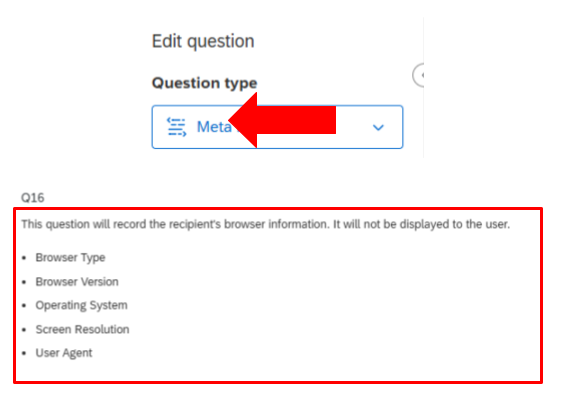
To learn more, please refer to the relevant Qualtrics Support page, and be sure you're viewing it in the context of the New Survey Experience (the default survey interface).
Additional compliance tip: You can include legal language in your survey to clarify that the signature provided represents the respondent’s consent or agreement. However, requirements may vary, so please consult your legal team to ensure the language and process meet your agency’s specific standards.
Current issues
The following issues have been reported and are in the process of being resolved.
- ID-6678 Hamburger Menu displaying on full width screen
- ID-6709(5304) Archived Icon not appearing for Ipers hyperlinked archived docs
- ID-6707 Disable Pantheon Advanced Cache on DOT site to investigate page update delay issue
- ID-5742 Unable to link to a remote document in WYSIWYG ends up with a link that 404s
- ID-6390 Fix PHP Warning
- ID-4987 Remove Media item which is deleted, when embedded through the ckeditor
- ID-4925 Investigate and report Google Search accessibility issues 4
- ID-3615 Link collection list indented when editors hidden title and no content in description field
- ID-4904 Google search console error Duplicate without user-selected canonical & redirect error
- ID-2020 Do not allow scrolling of the page when a layout builder modal is open
- ID-3338 Copy/pasted ext links might not be detected as such
- ID-6152 Fix marking any URL containing iowa.gov as Internal
- ID-6565 Contact embed text overlap in chrome 1064px
- ID-4268 Filtering media gallery after opening and closing it
- ID-4617 Adjust Visual Link Collection breakpoint to switch to 2 column at 1060px for when even number of cards is present
- ID-4686 Media listing topics column only show 2 values
- ID-4735 Confirm Areas served is being respected inside a Listing page of Locations (map)
- ID-4775 Fix spacing on listing page headers
- ID-4820 Make media permissions consistent across different types
- ID-4846 Check if Parent is not a link when reorganizing path alias on Footer Menu
- ID-4923 Investigate and report Google Search accessibility issues 2
- ID-4924 Investigate and report Google Search accessibility issues 3
- ID-4755 Adjust top padding when micro-content titles are hidden
- ID-2801 Headings in edit form widgets skip levels
- ID-5707 Alt Text field on Image form throwing an error message
- ID-6688 Accessibility flag for the title search box field in a listing page
- ID-6706 Basic Page Preview Button Breaking when embedding Promo's
- ID-6721 Search box display issue - cut off in multiple browsers