
On this page...
What is Digital Experience - DX?
This area is co-led by Jessica Van Heuveln, the Qualtrics CX Program Manager, and Natalie Sipes, the DX IT Portfolio Manager.
The Digital Experience - DX services provide web intercepts and Digital Experience Analytics - DXA, which includes features such as heatmaps, user session replay, funnel analysis, and engagement tracking.
Natalie Sipes, the DX IT Portfolio Manager, provides a brief overview of the suite of DX tools available within Qualtrics in this YouTube video.
- Jade Hill, the Qualtrics Technology Account Manager, presented on how to use Qualtrics DX to help organizations listen to their users, understand their needs, and take meaningful action based on those insights. You can view her presentation by watching this YouTube video.
Access to Qualtrics DX
Access to Qualtrics DX is limited to Agency Managers. Before you can use Digital Access and view DX Dashboards, your account must be provisioned. To request access, please submit a Qualtrics request through ServiceDesk Plus.
Digital Assist
Digital Assist shows you how users interact with your website by capturing their behavior - like where they click, how far they scroll, and where they might get stuck or frustrated.
Digital Assist Overview YouTube Chapter
- Session Replays: Watch recordings of real user sessions to see exactly how someone moved through your site.
- Funnels: Track the steps users take and see where they drop off.
- Heatmaps: Visual maps that show where users are clicking, hovering, or ignoring content.
- Filters: Narrow down the data to specific users, devices, or behaviors to find patterns.
DX Dashboards
We’ve continued to improve the Qualtrics DX experience, and you may have noticed a new dashboard in your Qualtrics account. With the updates Qualtrics has made to both the backend infrastructure and the front‑end interface, you now have access to the new and improved Iowa DX Dashboard 2.0. Both the Iowa Digital Experience Analytics Dashboard and the Iowa Online Feedback Dashboard are no longer accessible as of July 1, 2026.
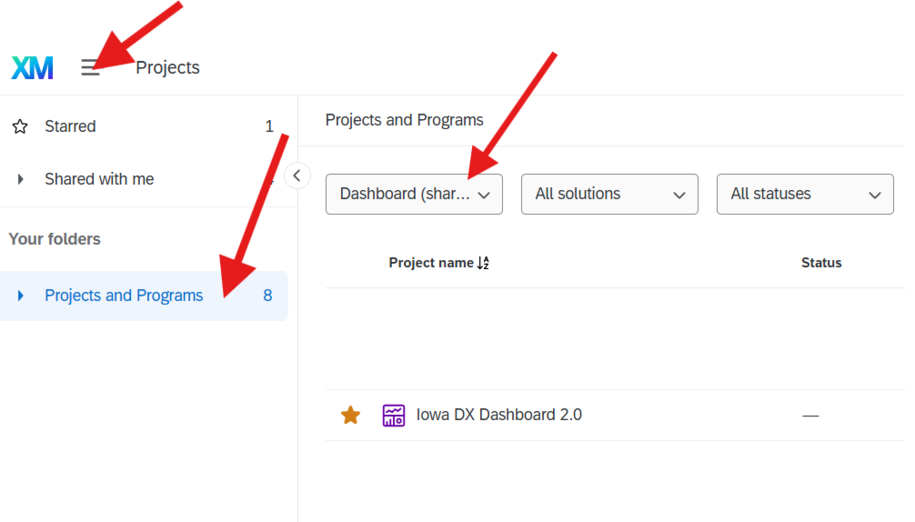
To find and use the new Iowa DX Dashboard 2.0, please follow the written instructions and video tutorial below.
To find:
- Log in to Qualtrics
- Click the menu icon - the three horizontal lines, also known as the hamburger icon
- Select Projects
- Select Dashboard - Shared
- Locate Iowa DX Dashboard 2.0
Note: These videos show the pilot dashboards: the Iowa Digital Experience Analytics Dashboard and the Iowa Online Feedback Dashboard.
Back to top